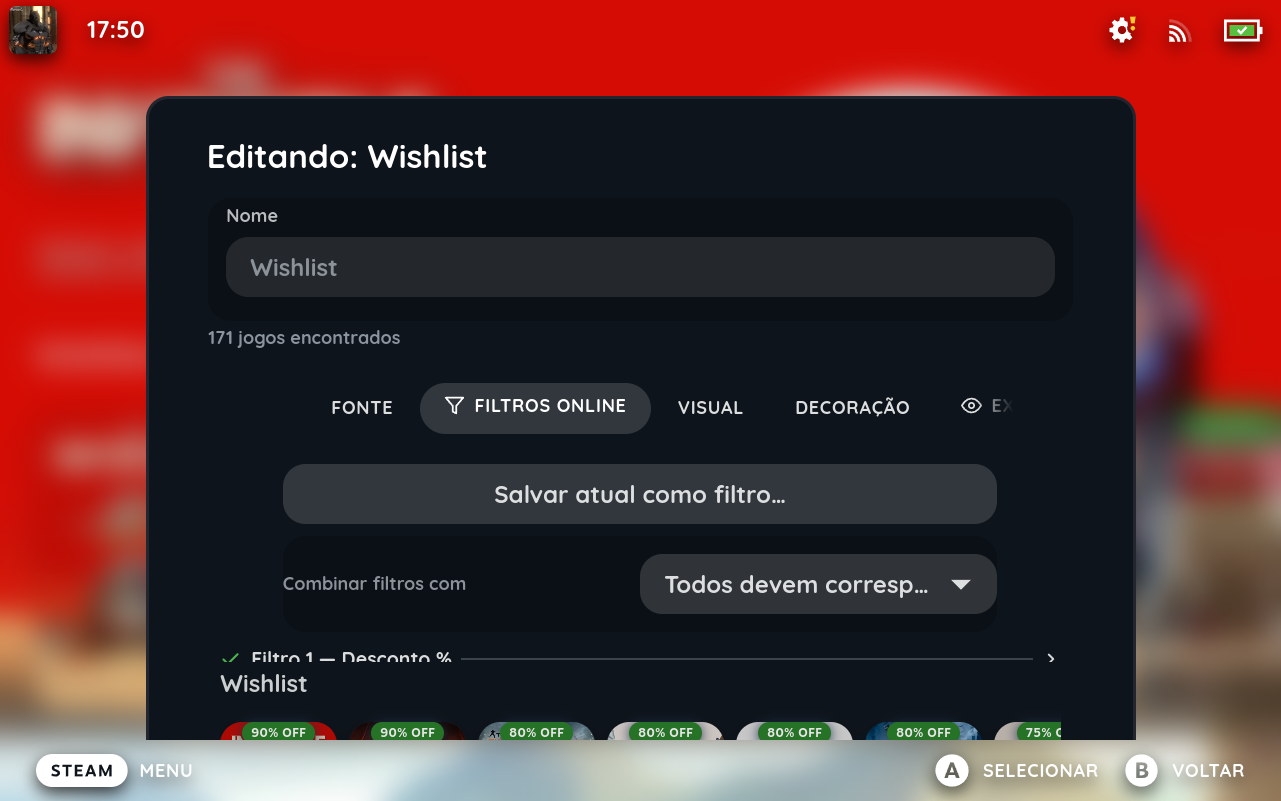
Advanced filter groups
Build precise queries with AND/OR logic across playtime, genre, status, achievements, friends, tags and dozens more criteria — saved and reused.
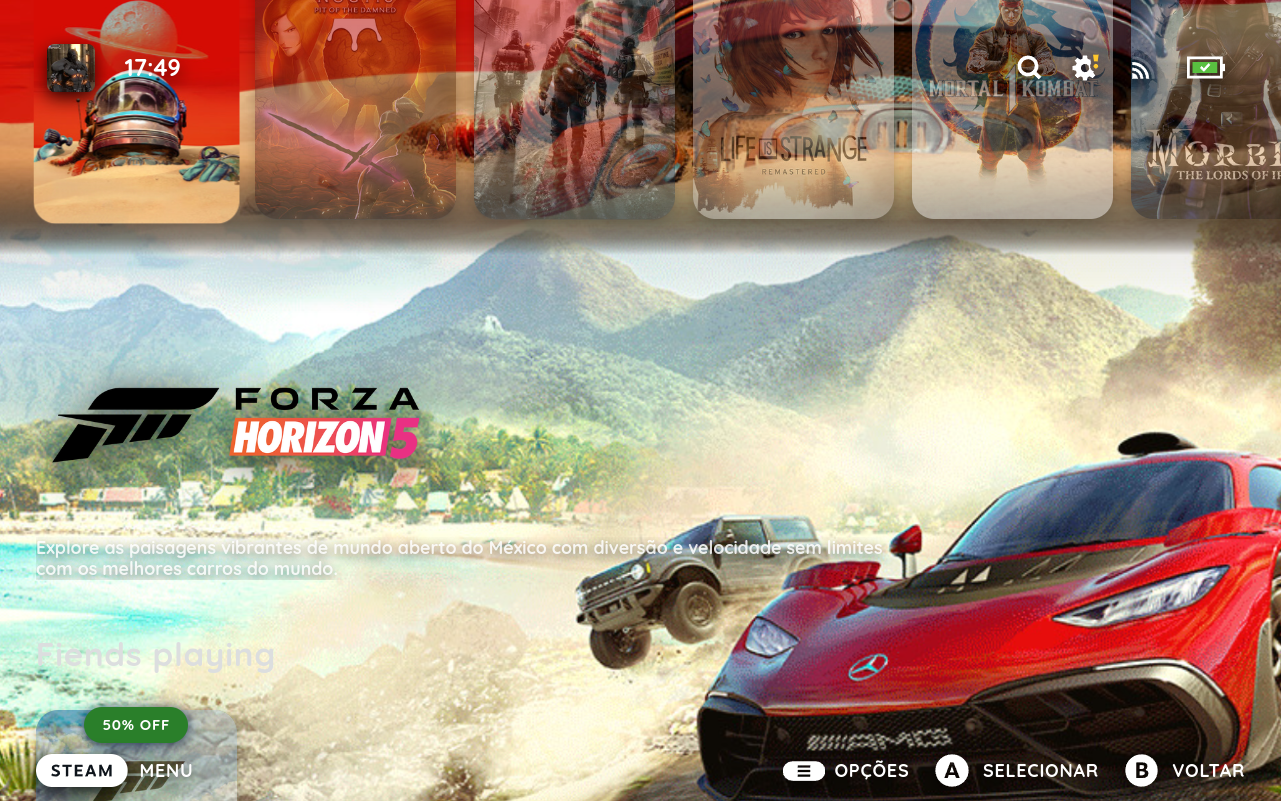
Multiple sources per shelf
Stack collections, library tabs, wishlist and store into one shelf via Union or Intersection, with online-only filters on merged results.
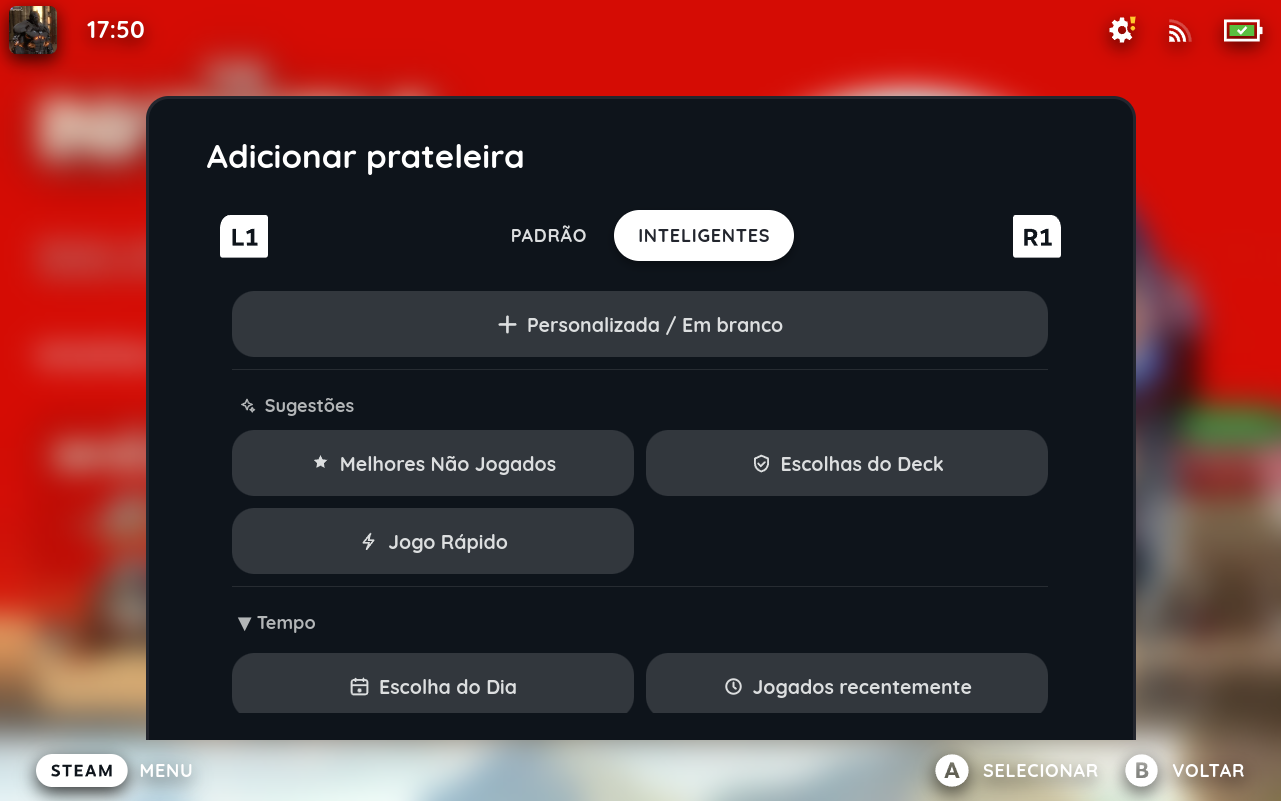
Smart shelves
30+ heuristic shelves like Deck Picks, Never Played or Time of Day that appear automatically when they're relevant and disappear when they're not.
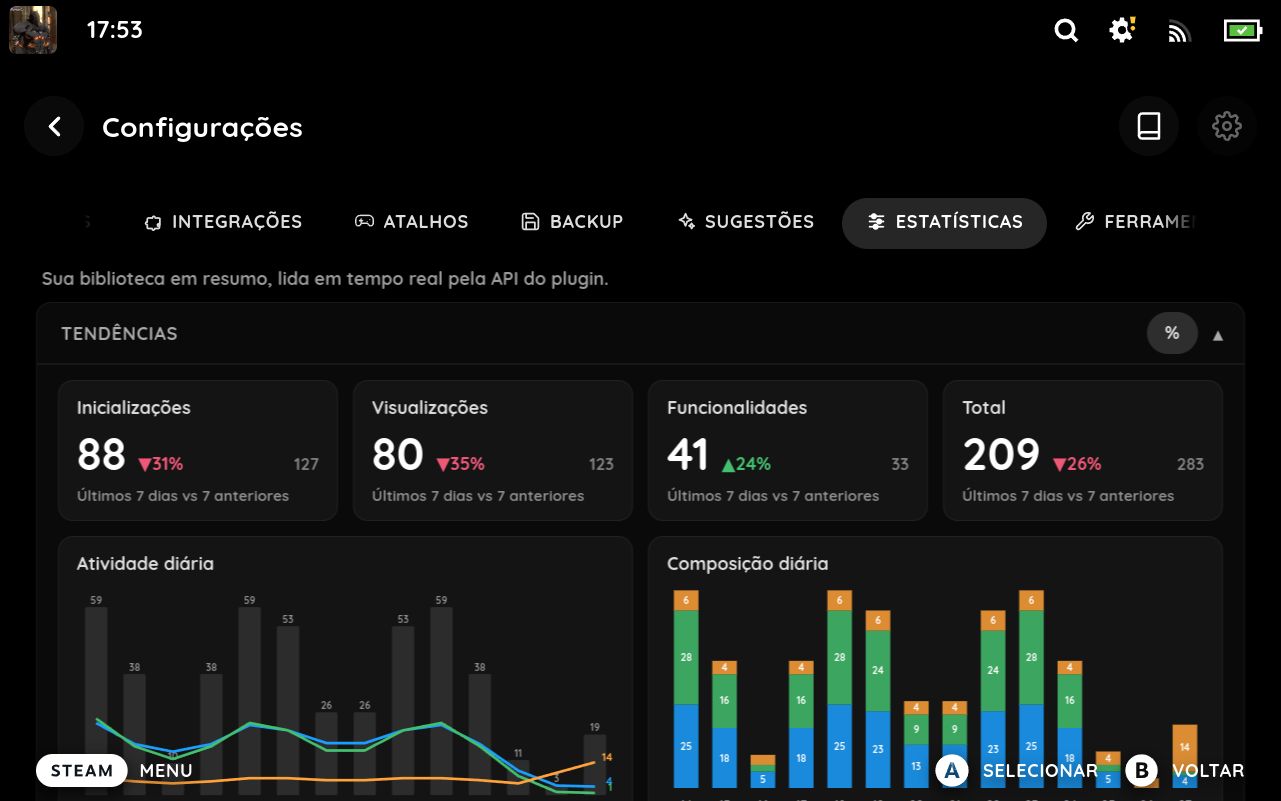
Statistics & suggestions
Real charts for activity, most-played games and library breakdowns, plus one-tap suggestions to create or clean up shelves.
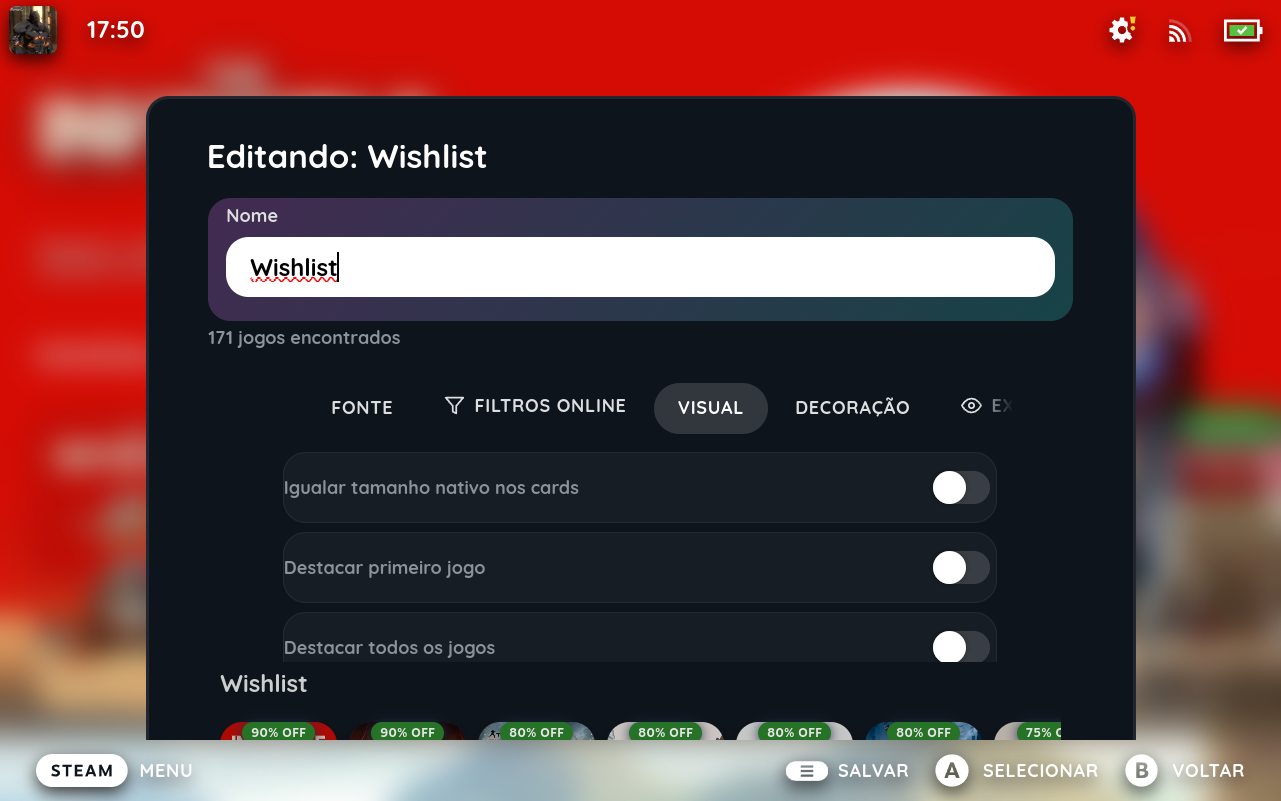
Decoration cards & visuals
Pin banners, logos, URL shortcuts or gaps, set your own hero art, and fine-tune position and sizing per shelf in a live preview.
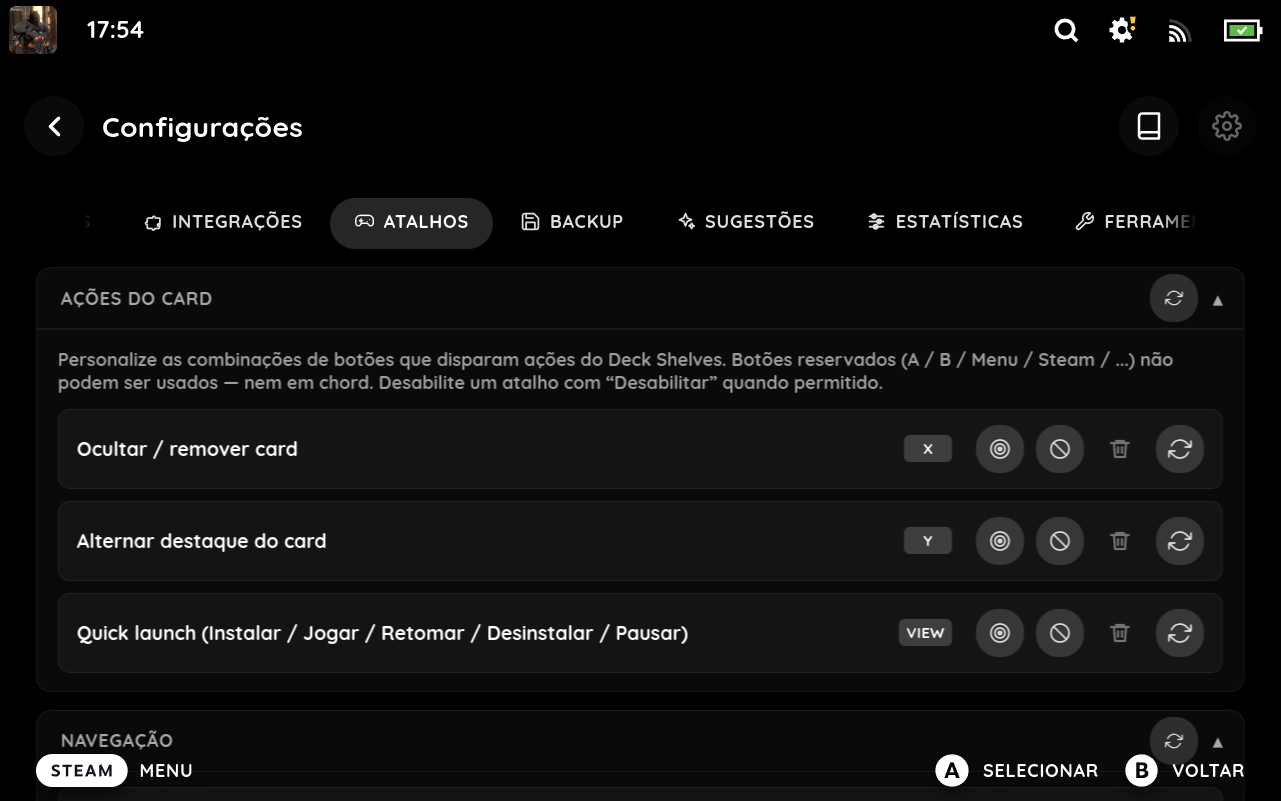
Remappable shortcuts
Change or disable the gamepad buttons for hide, highlight, quick-launch, Quick Search and Side Navigation — single, chord or double-tap.
Complete feature list
- Inject custom shelves into
library/home - Shelves backed by collections, library tabs, or custom filters
- Multiple sources per shelf — stack collections + tabs + wishlist + store into one shelf via Union (games in any source) or Intersection (games in every source). Filter source stays exclusive; use the filter
mergefor multi-criteria predicates instead. When any child is wishlist or store, an Online filters tab in the editor applies online-only predicates (discount, friend activity) across the merged result. - Decoration cards — pin fixed-slot cards at any position in a shelf: text label, image banner, focusable URL shortcut, or a transparent gap. New cards land at the slot focused in the preview and inherit the row's current order via manual sort. Image cards support optional hero art (acts as the per-shelf hero background on focus) and a shadow mode (Never / On focus / Always) for clean transparent PNG framing.
- Quick add to shelf — every game's context menu (in DS shelves AND the native library) exposes "Add to shelf" with the eligible shelves only (skips shelves at their limit, the 50-entry cap, or already containing the game).
- Y-button highlight toggle — focus a game, press Y to toggle the per-card highlight without opening the context menu.
- Advanced filter groups with AND/OR logic for complex game queries
- Filter games by:
- Favorites, installed, hidden, non-Steam
- Shortcut type — 15 kinds covering Games, Software, Tools, Demos, DLC, Music / Soundtracks, Videos, Comics, Guides, Drivers, Configs, Hardware, Betas, Applications, and Non-Steam links
- App status — 14 options for Running, Launching, Installing, Validating, Downloading (compound + fine-grained), Queued, Paused, Reconfiguring, Staging, Committing, Not installed, Installed (idle)
- Name (substring or regex)
- Deck compatibility level
- Playtime range (min / max minutes)
- Played within N days
- Update pending
- Store tags, achievement count, friends who own
- Friends playing now — matches games at least one Steam friend is in-game on right now (online features required)
- Friends played recently — matches games any Steam friend played within the last N days (1–30, default 14; online features required)
- Discount range — matches games whose Steam store discount sits in a chosen min/max % range (online features required)
- Price range — matches games whose Steam store price falls in a chosen min/max range, in your own store currency (online features required)
- Remote Play location — matches by where a game is installed: locally, on another device, remote-only, or both — powers a "play from another Deck / PC" shelf
- System compatibility — keeps only the games available on the platform you're currently running
- Recently active — games you've played in the last two weeks (your current rotation)
- Neglected — games you played before but haven't launched in the last N days
- Sort shelves alphabetically, by recent play, total playtime, release date, size on disk, Metacritic score, review score, discount %, price, original price — each direction (asc / desc) togglable per shelf via an icon button next to the sort dropdown
- Multi-key sort — chain a primary sort with one or more tiebreakers (e.g. *biggest discount → metacritic score* breaks ties between games at the same discount). Each row has its own asc/desc toggle. Stable chain — secondary keys only kick in when the primary genuinely ties.
- Library tab selection shows your actual runtime tabs, including those created by other plugins
- Dynamic card sizing — shelves match native card dimensions and from themes
- Highlight first game — first card renders as a landscape featured card
- Highlight all games — toggle per-shelf or globally to render every card as a landscape featured card
- Hide status line — toggle to hide the the play/install status of a game
- Hide trailing cards — separate per-shelf and global toggles to hide the "See more" tile and / or the "Refresh" tile on shelves that emit them (random-sorted regular shelves and refreshable smart shelves). The "See more" tile also hides on its own when a shelf already shows every game that matches, so it only appears when there's actually more to see
- Per-shelf size — limit slider goes up to 50 cards in the shelf and smart-shelf editors
- Sub-filters for collection and tab sources — when a shelf's source is a collection or library tab, an Additional Filters tab in the editor lets you add further filter criteria on top of the source
- Manually hide games per shelf — "Hide specific games" toggle in the Display tab opens a mini-card picker; the shelf automatically fetches extra candidates to keep the configured number of visible cards filled
- Deduplicate by name — per-shelf and global toggle that collapses entries sharing an exact name (Steam wins over non-Steam)
- Hide recent games — toggle to hide the native "Recently Played" section
- Use first shelf as recents (experimental) — when "Hide recent games" is on, injects the first shelf's games into the native recents component instead of hiding it; reuses native DOM/CSS/animations for full CSS Loader theme compatibility; auto-disables with a banner on failure
- Hide home tabs — toggle to hide the native home tab bar on te bottom of shelves
- Hero background art — enable it per shelf (regular or smart) in the editor's Visual tab, or globally for every shelf at once; the focused game's background art appears behind that shelf, following it wherever it sits — works with or without hiding the native recents row
- Force CSS Loader themes — promotes every shelf into the native-like-recents selector space so themes like ArtHero apply consistently across all shelves (only shown when CSS Loader is installed)
- Developer / Publisher filter — filter games by developer or publisher with automatic batch discovery
- App ID list filter — whitelist an explicit set of app IDs to pin specific games to a shelf
- Mouse hover support — cards show labels and brightness on hover, same as gamepad focus
- Per-day time-window overrides for smart shelves — a Smart Filters toggle opens a dedicated Overrides tab where each weekday can have its own hour ranges, on top of the shelf-level default hours and day filter
- Advanced visibility rules — show a shelf (regular, smart, or saved filter) only when custom conditions match, combined with match any or match all (Evenings / Weekends presets):
- Time — hour-of-day and day-of-week windows, weekend vs weekday, part of the day (morning / afternoon / evening / night), season (hemisphere-aware), and your own holiday date ranges
- Device — low battery, charging, offline, docked / external display, minimum screen resolution, ultrawide
- Session — whether the last game you played was Steam or non-Steam, or whether a game is currently running
- Performance — high CPU, low memory, or low frame rate — read on demand only when a shelf actually uses them (no background polling)
- Auto-pin & auto-collapse shelves — give any shelf (regular or smart, from the editor's Display tab) the same kind of condition tree to auto-pin it to the top of the home while the condition holds (reverts when it clears), or auto-collapse it to just its header when a condition matches or the shelf is empty. Both opt-in; a home with neither configured is unchanged
- Live shelf preview in the editor — the preview area shows real cards as they appear on the home (title, name, status line, compat / new / non-Steam badges, See more / Refresh tiles) and reflects every Display-tab toggle in real time
- Smart Shelves — 30+ heuristic-driven shelf types that appear automatically when conditions are met and disappear when no games match. Game-focused: Daily Pick, Deck Picks, On Deck, Recently Played, Long Sessions, Roulette, Not Started, Best Unplayed, Quick Play, Interrupted, Non-Steam, Spare Time, Time of Day, Rediscover, Forgotten. Heuristic templates: Backlog Rescue, Forgotten Gems, Hidden Gems, Travel Mode, Never Touched Classics, Recent Hidden Installs, Weekly Rotation, Monthly Spotlight, Seasonal Rotation (each with tunable cooldown / staleness / review-floor / rotation knobs). Media-focused: Soundtracks, Videos, Demos, Cloud games. Runtime-aware (best-effort against Steam runtime data): Low Battery Mode, Almost Finished, Couch Gaming, Co-op Ready, Party Games. Online-gated: Friends Playing. Ordered by probability of results in the picker
- Saved smart shelf templates — persist a fully-tuned smart shelf config and reuse it from the template picker; exposed to plugins via the public API
- Surprise Me — sub-toggle that hides the manual smart shelf list and lets the system pick 1–5 templates each day automatically; configurable count slider (0 = system decides)
- Shelf templates — 11 presets (Favorites, Recently Played, Installed, Most Played, Recently Added, Awaiting Update, Non-Steam, Long Sessions, Steam Cloud, Deck Verified, Top Reviewed) in a 2-column grid picker. Picking any template — Blank, regular preset, smart preset, or Custom — opens the edit modal first; nothing is persisted until you press Save, so cancelling discards the draft cleanly.
- Quick Search overlay — L1+R1 on a card pops a centered translucent search pill that fuzzy-matches against every game in your visible shelves (covers cards below the fold and items still loading metadata). NFD normalisation handles diacritics (e.g. café ⇄ cafe). After a brief pause the top hit scrolls into view and gets focused. Two toggles: "Open virtual keyboard" (default on, controls the auto-popup) and "Search only on Enter" (default off, swaps the debounce for an explicit-trigger flow). L1, R1, or B closes the overlay regardless of whether a physical or virtual keyboard has focus.
- Side Nav overlay — L1 twice on any card slides in a left panel listing every visible shelf in the order they render on the home (uses CSS
orderfor accurate visual order). Steam-themed left edge bar marks the focused row; the panel auto-focuses the shelf you came from, not the first one. R1+L1 / B / dpad-right close it; selecting a row jumps focus to that shelf's first card. Plugins can contribute extra rows via the public API. - Dedicated Settings page — opened from the gear icon in the QAM title bar: a full-page route with seven tabs (Quick settings, Shelves, Profiles, Integrations, Shortcuts, Backup, Advanced tools) backed by the same actions as the QAM and sidecar
- Version everywhere + richer System information — the exact plugin version shows in a standard footer on every settings page and the QAM (handy for bug reports); Advanced → System information lists your real active CSS Loader theme names and installed count instead of a heuristic
- Usage profiles — save the setup (every toggle, saved filter, and — if you tick Link shelves to profile — your shelves) as a named profile, switch in one tap, import / export to JSON. A Default profile restores factory settings while keeping the plugin on; it only clears your shelves if you opt in
- Profile auto-switch triggers — give a saved profile a trigger (the same visibility conditions above) and turn on auto-switch so it applies itself when the trigger matches — a *Docked* profile when you dock, a *Battery saver* profile when the battery runs low. Each profile sets its own triggers; the master toggle sits in the QAM, the sidecar and Settings → Profiles, and triggers round-trip through export / import and the System information summary
- Customizable button shortcuts — remap or disable the gamepad triggers for hide / highlight / quick-launch, and remap the chords for Quick Search and Side Navigation. Single, chord, and double-tap inputs are supported, including back-grip and stick-click buttons (
L3/R3/L4/R4/L5/R5); reserved system buttons are rejected - Unified shelf list + drag-and-drop reorder — opt in to merge regular and smart shelves into a single ordered list and drag rows directly in the Shelves panel (gamepad
↑/↓buttons stay as a fallback) - External launcher discovery — EmuDeck, RetroDECK, Heroic, Lutris, Moonlight, and Chiaki games surface through dedicated shelf sources; read-only, refreshed every 15 minutes in the background
- Integrations panel — every registered descriptor (built-in or third-party) gets a per-row enable / disable; first-party entries carry a green BUILT-IN chip
- Display modes — Normal / Light / Advanced — *Light* gives a minimal experience: the home drops per-shelf logo / icon / description / hero and disables context search + side navigation, and their now-dead controls are hidden from the QAM / sidecar; *Advanced* unlocks the Advanced-tools tab (verbose logging, on-device diagnostic logs, reset shortcuts) and always-on Integrations; *Normal* is the default. Light and Advanced are mutually exclusive and stored per profile. Full matrix in docs/display-modes.md
- Custom artwork refreshes on home return — replace a capsule / logo / hero / icon elsewhere, press B back, and the new bitmap appears in the row with no plugin reload
- Reorder and toggle shelf visibility from the QAM
- Online shelf sources (opt-in) — wishlist and Steam Store shelves with
price_low,discount_high,original_price_highsorts; four ready-made templates (Wishlist, Wishlist on sale, Free wishlist, Free now); cached locally so the home keeps working offline - Exclude owned games — per-shelf toggle on wishlist / store sources that hides any game whose appid or exact name matches a title in your local library; sub-toggle for non-Steam shortcuts (from other storefronts), and a further sub-toggle for cloud-play catalogue stubs (cloud-gaming services surfaced via Unifideck) so promotions on the cloud catalogue still surface
- Discount badges — cards on online shelves show a green "% off" badge (mirrors the NEW badge slot, shown even on placeholder cards while artwork is still loading)
- Refresh action everywhere — context-aware "Refresh cache" / "Refresh" available from the QAM action menu, the shelf-card context menu, and the trailing refresh tile
- Import / export all shelves and smart shelf configuration as JSON
- Persistent settings across plugin reinstalls
- Crash protection with automatic retry
- Multi-language support (EN, EN-GB, PT-BR, PT-PT, FR, FR-CA, DE, ES, ES-419, IT, RU, PL, NL, TR, UK, JA, KO, ZH-CN, ZH-TW)